What if students could discover the whole world behind music, not just what happens onstage?
Throughout my career, I've noticed a gap in music education. Students may spend years singing, playing instruments, and performing, yet never get to explore who records the music, engineers the sound, designs the lighting, or directs the cameras. Those opportunities often don't appear until high school, college, or a specialized program, if students encounter them at all. I don't think we need to wait that long.
At Kendall College & Career Academy, I'm working to bridge that gap through three connected pathways: music production, KCCA News, and the Live Production Team. Each one gives elementary students a different way into the creative process and a chance to discover where their interests and strengths might take them.
Resources made available with support from the Magnet Schools Assistance Program (MSAP) have helped expand what we can offer, from music-making tools to audio, lighting, and video equipment. The point isn't technology for its own sake. It's giving students authentic opportunities to CREATE | PERFORM | PRODUCE.
Three connected pathways at Kendall
There's more than one way to find your place.
Some students love performing. Others find their confidence behind a microphone, camera, laptop, or mixing console. These pathways let students try different roles and discover how their contributions fit together.
♫
MUSIC PRODUCTION
From musical ideas to original work
Starting with the rhythms, melodies, and instruments we explore in music class, students begin experimenting with beat-making, composing, recording, and editing. Through projects using tools such as BandLab, students explore roles like composer, recording artist, music producer, and sound designer as they learn how a musical idea becomes a finished track.
What students discoverThe difference between playing a part and shaping the whole recording, from the first beat to the finished mix.
KCCA News gives students authentic responsibilities as producers, reporters, camera and audio crew, lighting crew, and editors. They research stories, write scripts, film segments, and build each broadcast as a team. In our school Canva workspace, students upload footage, collaborate, and edit videos in the cloud before sharing their stories with the school community.
What students discoverHow storytelling, speaking, camera work, editing, and teamwork give students ownership of what their school sees and hears.
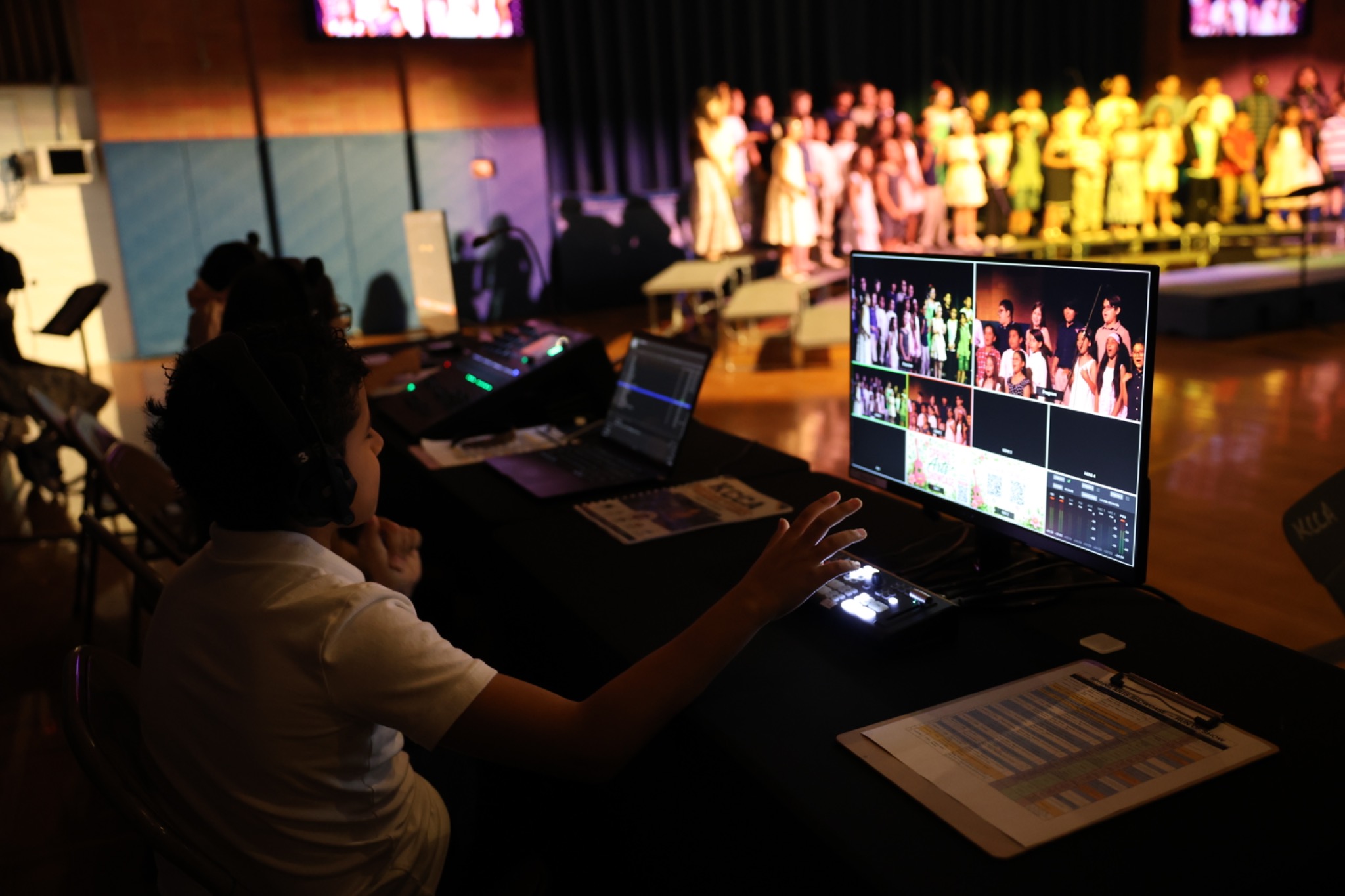
Our students don't just take the stage. With guidance, they help plan and produce concerts and school events. They explore roles such as sound director, lighting director, camera operator, video director, and show caller. From microphone levels and lighting cues to switching camera feeds and following a run of show, each student learns how their decisions support the performers and the whole crew.
What students discoverHow sound, lighting, video design, directing, and careful communication turn separate responsibilities into one live event.
BandLab and Canva may require an authorized account. Students should use their school-approved access and follow school media and privacy guidelines. Lighting design software is an external learning resource for supervised exploration.
Student growth and leadership
From exploring to leading.
The KCCA Productions student handbook outlines a learning pathway that can grow with each student. Some discover their strengths in music, others in news or live events. Across all three pathways, the goal is to build skills, independence, teamwork, and leadership through real projects.
LEVEL 01
INTERN
Learn with guidance
Explore different jobs, observe the team, ask questions, and practice new skills.
LEVEL 02
CREATOR
Create with support
Contribute to a real project, use tools with help, and build confidence through practice.
LEVEL 03
PRODUCER
Work independently
Take ownership of a task, solve problems, and follow a project through to completion.
LEVEL 04
DIRECTOR
Lead and support others
Guide a team, communicate decisions, and help others succeed.
The handbook also provides opportunities to reflect on progress through skill checklists, student self-assessment, and portfolios. These levels describe a pathway for growth, not a race or a fixed grade-level track.
A real production, real responsibilities
What it takes to bring a concert to life
Students see that a concert is much more than the performance onstage. Our Live Production Team learns how each department prepares, rehearses, communicates, and responds during a show. The aim is for students to make meaningful creative decisions while learning to work as one crew.
Student production work in action during a concert.
01 / SOUND
Make every voice heard
Prepare microphones, check levels, balance speech and music, and listen closely so the audience can hear the performance.
02 / LIGHTING
Help tell the story
Choose lighting looks, plan transitions, and follow cues that support the mood and movement of each performance.
03 / VIDEO + DIRECTION
Show the moment
Plan camera shots, operate video switching, follow a run of show, and communicate when each team is ready.
From rehearsals to the final cue, students begin to understand that the people behind the scenes are creators and performers in their own right.
Opportunity creates ownership
Not every student finds their place in the spotlight.
Some discover it behind a microphone, some at an instrument, and some behind a soundboard or camera. Giving students choices helps them build confidence, develop responsibility, and see that their contribution matters to the finished product.
These pathways are growing, and so is Creator Studio. My hope is to share what we're building, the lessons we learn, and ideas other educators can adapt to give their own students access to these possibilities.